How to start a bellringer?
Open class with a few ACT questions. Students join on their phones.
Step by step
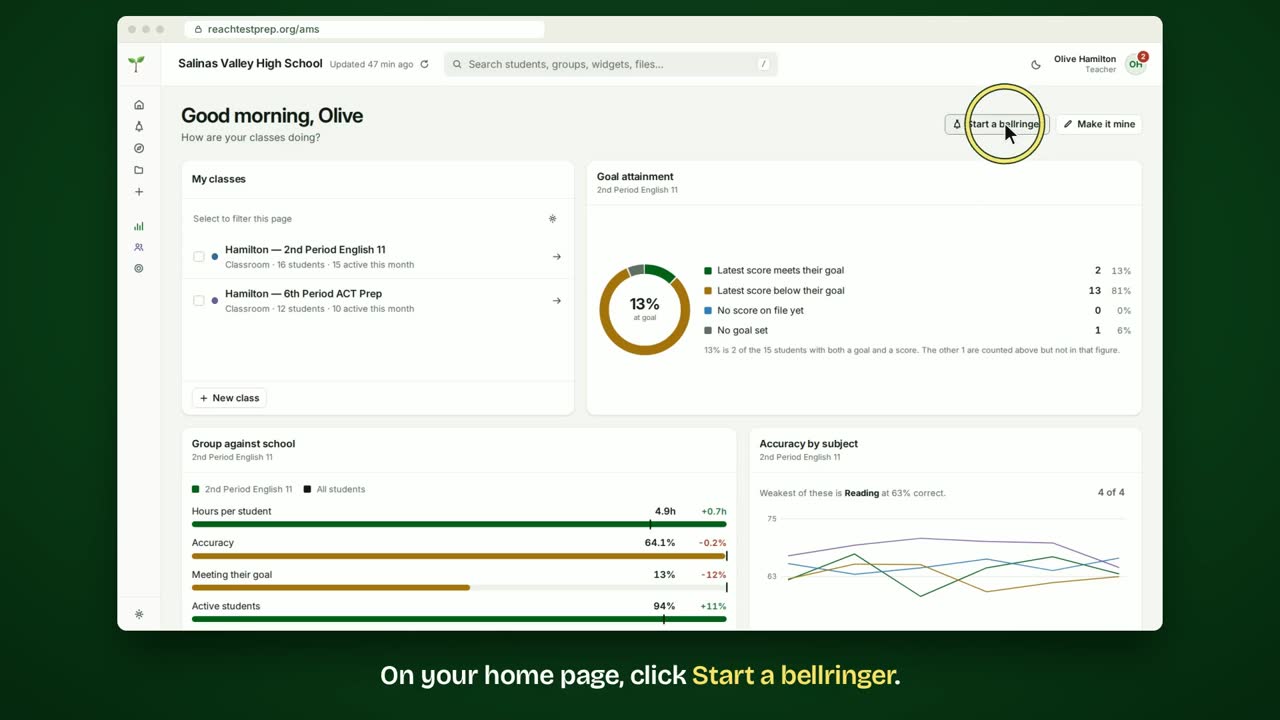
- On your home page, click Start a bellringer.
- Check the class. Your first class is already chosen.
- Choose a game. Reach's pick suits how your class is doing.
- Choose the subjects and how many questions.
- Look over the questions. A different question swaps one out.
- When you're ready, click Open the board.
- Put the board up for your class. Students scan the code, or go to reachtestprep.org/bell and type the number.
- As students join, their names come up on the board.
- When your class is in, click Start.
- Everyone gets the question on their phone and answers in their own time.
- The board counts the answers as they come in.
- Then reveal the answer, and talk it through together.
In short
Click Start a bellringer and check the class. Choose a game, set it up and look over the questions. Click Open the board. Students join at reachtestprep.org/bell. Click Start when your class is in.
ACT® is a registered trademark of ACT Education Corp. Reach Test Prep isn’t affiliated with ACT. Spotted something out of date? Email reach@reachtestprep.org.